

Key Takeaways
- Authentication is only the starting point. Inbox placement depends on trust, engagement, and sender behavior.
- Deliverability is becoming a signal-based system, not a reactive troubleshooting exercise.
- Mailbox providers evaluate how recipients interact with your email, not just whether it passes technical checks.
- Consistency matters. Sudden spikes, poor list hygiene, and ignored signals can damage reputation over time.
- The strongest senders are not chasing inbox hacks. They are building trust one signal at a time.
Every day, more than 392 billion emails are sent worldwide––that’s roughly 50 emails per person on Earth. But the sobering reality is, roughly 90% never make it past the gateway. They are rejected before mailbox providers even evaluate them for spam.
At Activate Summit 2026, Tom Corbett, Senior Deliverability Consultant at Iterable, challenged marketers to stop treating deliverability as a technical problem to fix and start viewing it as an ongoing trust conversation with mailbox providers.
“What if deliverability isn’t a problem to solve, but a conversation you’re already in?”
— Tom Corbett, Senior Deliverability Consultant, Iterable
Mailbox providers like Gmail, Yahoo, and Microsoft are not simply filtering out bad mail. They are trying to identify trustworthy senders in an environment flooded with noise.
For marketers, the question is no longer “Why do I have a deliverability problem?” The better question is: “What signals am I sending to prove I’m worth delivering?”
| Check out Corbett’s full session, Standing Out in the Noise: Rethinking Deliverability in 2026. |
Why Authentication Alone Won’t Get You Into the Inbox
Most marketers already understand the importance of authentication standards like SPF, DKIM, and DMARC. But one of the biggest misconceptions in deliverability is assuming those requirements guarantee inbox placement.
Two senders can both meet Gmail and Yahoo’s technical requirements and still experience completely different inbox outcomes. The difference comes down to reputation, consistency, and trust signals that develop over time.
That distinction becomes especially important with DMARC enforcement––a requirement to reach over 50% of B2C audiences and up to 96% of B2B audiences.
Many brands stop at a DMARC policy of “none” because it satisfies minimum requirements. The problem is that “none” only identifies the sender. It does not actively protect the domain from impersonation or spoofing attempts.
Stronger policies like quarantine or rejection send a different message to mailbox providers:
- This sender is actively protecting its identity
- This domain is aligned with ecosystem standards
- This sender takes trust seriously
Why BIMI Is Becoming a Competitive Advantage
Once brands move beyond minimum authentication requirements, they unlock something increasingly valuable: recognition.
Brand Indicators for Message Identification, or BIMI, allows verified brands to display logos directly inside the inbox experience. That visibility helps legitimate senders stand out while reducing the appearance of anonymous or suspicious traffic.
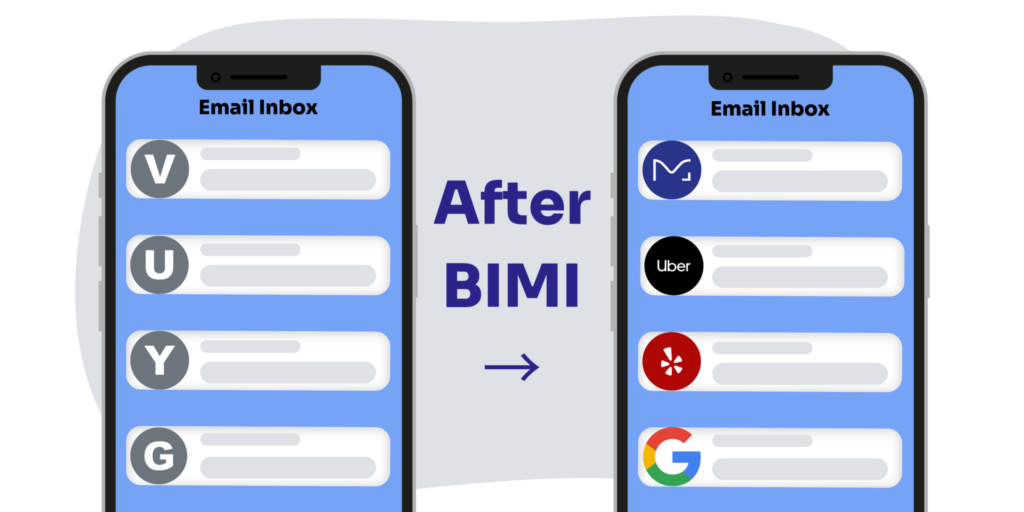
Corbett shared one especially striking example from Iterable customer Fabletics.
- Before Black Friday, the company implemented BIMI and Apple Branded Email in just 10 days. At the time, only 3% of retail domains analyzed had implemented BIMI.
- The result was an estimated 90% visual reach across mobile inbox providers while competitors continued appearing as generic senders.
Email Is a Two-Way Street: Stop Using No-Reply
One of the most overlooked deliverability signals is whether your brand accepts and responds to customer replies. Microsoft’s high-volume sender requirements now explicitly emphasize two-way communication. Yet many marketing teams still rely on no-reply email addresses that reject inbound responses completely.
Corbett explained that every bounced reply weakens the idea that there is a real relationship between sender and recipient. Over time, that can influence how providers evaluate trustworthiness and inbox placement.
The fix is often surprisingly simple:
- Replace no-reply addresses with active sender addresses
- Ensure reply-to inboxes can accept mail
- Align reply domains properly for DMARC consistency
Even if replies are not actively monitored, accepting inbound messages matters because it reinforces the idea that communication is legitimate and reciprocal.
| Want a deeper breakdown of authentication, inbox placement, sender reputation, and DMARC best practices? Check out our guide: Email Deliverability 101: How to Reach the Inbox Every Time. |
Engagement Signals That Mailbox Providers Are Actually Watching
For years, marketers treated opens as a primary performance metric. But according to Corbett, that interpretation misses what mailbox providers are actually evaluating.
“An open doesn’t prove that a human read the email. It simply proves a tracking pixel was triggered by something.”
— Tom Corbett, Senior Deliverability Consultant, Iterable
Privacy protections, bots, and image proxies have made opens increasingly unreliable as a measure of readership. But they still matter for another reason: inbox placement.
Corbett outlined two patterns marketers should pay close attention to:
- A sudden drop in opens often signals inbox placement issues
- A gradual decline usually points to fatigue or reputation decay
The same logic applies across broader engagement behavior. Mailbox providers observe far more than clicks alone. Over time, signals such as replies, read time, forwarding, starring, deletes, and prolonged inactivity shape the sender’s reputation.
Silence Is Its Own Signal
One of the most important takeaways from the session was that silence itself becomes a signal. A large inactive audience can outweigh the positive engagement from a smaller active segment.
“Every email you send someone who doesn’t care, it makes it harder to reach the people who do.”
— Tom Corbett, Senior Deliverability Consultant, Iterable
That’s why Corbett encouraged marketers to stop managing lists like static broadcast audiences and start treating them like living lifecycle systems.
That includes:
- Re-engaging inactive subscribers intentionally
- Suppressing disengaged audiences when needed
- Encouraging replies and two-way interaction
- Optimizing for long-term trust, not short-term volume
The “Promotions” Tab Is Not the Enemy
For years, marketers have treated the “Promotions” placement as failure and chased “Primary tab hacks” designed to manipulate inbox categorization. Corbett posed a different perspective: “Promotions” isn’t a failure. It’s a curated space where users go when they’re ready to browse and buy.
Trying to force emails into the “Primary” tab through tactics like hashbusting, deceptive formatting, or “move to primary” prompts may create short-term gains. However, those user behaviors can weaken a sender’s reputation over time and create additional scrutiny from mailbox providers.
Improve Promotions Tab Visibility with Google Annotations
Instead of fighting the Promotions tab, marketers should focus on building better experiences for customers already engaging there. That is where Google Annotations become especially interesting.
Annotations allow marketers to surface product imagery and promotional content directly inside the Promotions tab before the email is even opened. The result feels closer to a visual browsing experience than a traditional inbox preview.
The feature also reinforces the larger trust narrative behind modern deliverability. Google requires DMARC enforcement before brands can participate, directly tying inbox visibility back to identity verification and sender trust.
Deliverability Monitoring Tools Marketers Should Use
Modern deliverability teams do not wait for inbox placement to collapse before investigating problems. They monitor reputation signals continuously and adjust early.
1. Google Postmaster Tools
Corbett pointed to Google Postmaster Tools as one of the clearest ways to monitor Gmail reputation, authentication health, and complaint trends. Google’s newer feedback loop reporting can also tie complaint spikes directly back to specific specific campaign and template IDs inside Iterablem, helping teams isolate problems faster.
Recommendation: Review Postmaster Tools regularly (weekly if possible) and separate marketing and transactional traffic for cleaner signals.
2. Microsoft SNDS
Microsoft’s SNDS dashboard offers a similar early warning system, especially for B2B senders that rely heavily on Outlook and Hotmail traffic. “View IP Status” shows when IPs are being junked and why, and Microsoft generally defines “active” users as recipients who have engaged within the last 90 days.
Recommendation: If Microsoft starts junking traffic, start with data quality—not creative—and suppress older inactive audiences first.
3. Bounce Codes Are Reputation Signals
Corbett highlighted abandoned mailbox bounces from Gmail as an important warning sign. In these cases, the account still exists but is no longer actively being used.
Recommendation: Suppress after one occurrence instead of continuing to retry delivery. For full mailbox bounces, suppress after three occurrences to demonstrate active list hygiene and signal awareness to mailbox providers.
Sending Best Practices That Improve Deliverability
Mailbox providers evaluate sending behavior over long periods of time, not just individual campaigns. Sudden spikes, inconsistent cadence, and poor-quality data can all weaken sender reputation over time.
1. Sending Cadence and Volume
Corbett emphasized that mailbox providers learn your sending rhythm over time. Large volume spikes often look like something went wrong rather than healthy growth, while predictable cadence builds trust.
Recommendation: Maintain stable sending patterns and avoid dramatic volume swings whenever possible.
2. Traffic Separation and URL Reputation
Transactional and marketing emails carry different risk profiles. A poorly performing campaign should not impact critical customer communications like password resets or order confirmations. Mailbox providers also evaluate every URL included inside an email, including third-party and affiliate links.
Recommendation: Separate transactional and marketing traffic onto different subdomains and regularly audit external links for reputation risks.
3. Timing and Rate Limiting
The counterintuitive truth is, sending slower gets you to the inbox faster. Most campaigns are scheduled directly on the hour, creating delivery congestion across mailbox providers. Repeated 421 deferrals can gradually weaken sender reputation over time.
Recommendation: Shift send times away from crowded top-of-hour windows (e.g., 9:23 AM instead of 9:00 AM) and gradually pace large sends instead of delivering full audiences all at once.
4. Signup and Audience Quality
The goal isn’t list growth — it’s qualified list growth. Many deliverability problems begin before the first campaign is ever sent. Low-quality signups, inactive audiences, and bot traffic can introduce reputation risk from day one.
Recommendation: Use email validation, bot protection (e.g., CAPTCHA or honeypot fields), and engagement checks before promoting subscribers into high-volume marketing audiences.
Because inbox placement is influenced by the full trust environment surrounding the message, not only the sending domain itself.
Frequently Asked Questions (FAQs) About Deliverability
1. What is email deliverability?
Email deliverability refers to a sender’s ability to successfully reach the inbox instead of spam folders or rejection filters. Modern deliverability depends on authentication, engagement signals, sender reputation, and sending behavior.
2. Why is DMARC important for deliverability?
DMARC helps mailbox providers verify sender identity and prevent domain spoofing. Enforcement policies like quarantine or rejection strengthen trust signals and unlock features like BIMI and branded inbox visibility.
3. Does landing in Gmail Promotions hurt performance?
Not necessarily. Gmail’s Promotions tab is designed as a browsing environment where users actively engage with marketing content. Attempting to manipulate placement into Primary can create long-term reputation risks.
4. Why are no-reply email addresses bad for deliverability?
Mailbox providers increasingly view email as a two-way communication channel. No-reply addresses that reject inbound responses can signal poor engagement practices and weaken trust over time.
5. How can marketers improve sender reputation?
Improving sender reputation requires consistent sending behavior, strong list hygiene, active engagement monitoring, suppression of inactive audiences, and authenticated domain practices like DMARC enforcement.
The Future of Deliverability Is Trust
Throughout the session, Corbett returned to the same core point: deliverability is not about gaming mailbox provider algorithms. It is about understanding the signals mailbox providers are already evaluating every day.
That means paying attention to:
- Identity and trust: authentication, DMARC enforcement, and brand recognition
- Feedback loops: Postmaster Tools, SNDS, complaint monitoring, and engagement signals
- Sending behavior: cadence, list hygiene, audience quality, and consistency over time
The brands performing best in the inbox are not the ones chasing shortcuts or “Primary tab hacks.” They are the ones building systems that consistently demonstrate credibility,
As Corbett put it during the close of the session: “The data is available, the feedback is already happening. The real question is, are you listening?”
| If you want to hear the full session and explore more practical guidance from Tom Corbett, watch Standing Out in the Noise: Rethinking Deliverability in 2026 on demand from Activate Summit. |