
Most developers now hand mobile SDK integrations to a coding agent. When that agent works from stale or version-mismatched guidance, the code can look right, compile cleanly, and still fail once the app is running. The developer finds out late, sometimes after customers do.
Iterable’s AI-Assisted SDKs give coding agents step-by-step setup instructions written by Iterable. The agent follows them instead of guessing, so the iOS, Android, or React Native SDK gets set up correctly the first time. Developers can go from about 18 hours of integration work to a verified first mobile message in under an hour.
What Are AI-Assisted SDKs?
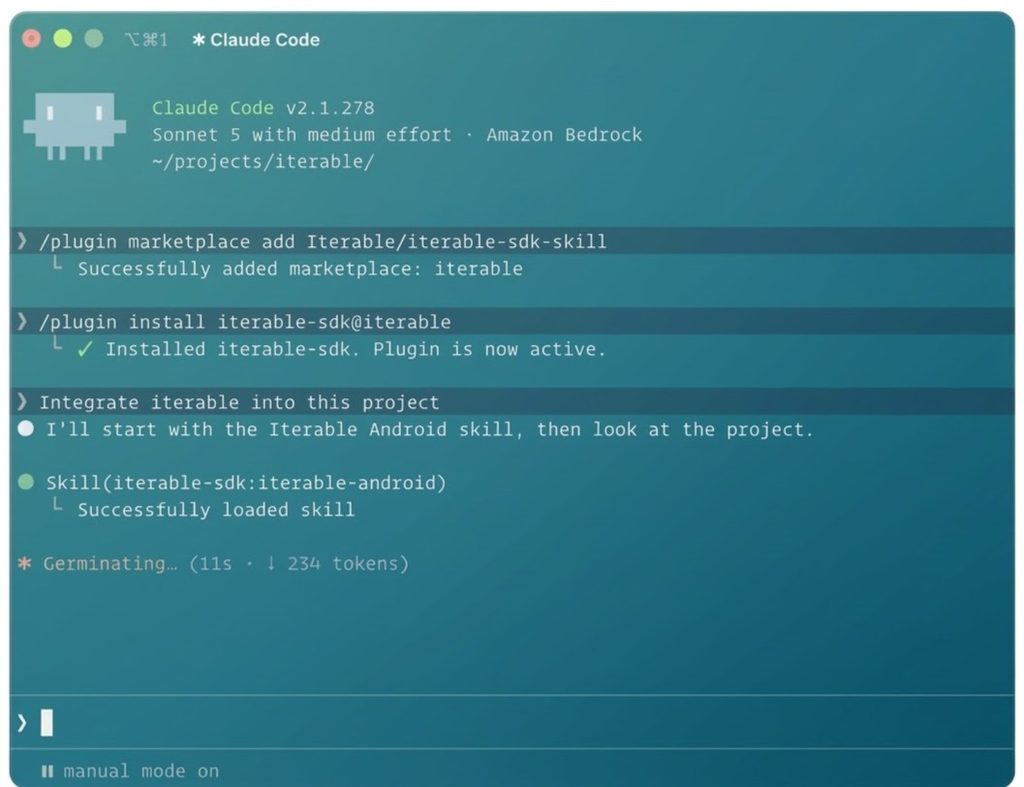
Each Iterable mobile SDK repo now carries version-specific instructions written for coding agents. Developers install Iterable’s SDK skill from Iterable’s public GitHub repo into Claude Code, Cursor, or Codex.
The skill guides the agent from setup to a working first message. It identifies the credentials the app needs, walks through platform-specific steps, and flags anything left to do. With the developer’s consent, it creates Android push credentials and guides Apple push setup on iOS.
How AI-Assisted SDKs Help Developers
Launch mobile channels with confidence
A clean build isn’t the finish line. The skill has the coding agent confirm that a real message reaches a test device, not just that the code compiles. Developers catch silent failures before customers do.
Give developers time back
Instead of piecing together the Support Center, GitHub READMEs, and release notes, the agent reads Iterable’s guidance right in the repo. Developers spend less time digging through docs and fixing agent mistakes.
Make security review cleaner
The guidance covers SDK integration only and never touches project data. Each SDK has to pass validation with no critical security or privacy failures before release. Security teams know what the skill can access, with no new data exposure.
How Developers Use AI-Assisted SDKs
Add a new mobile channel: A developer asks their coding agent to add Iterable push to an app. The skill sets up Android push, guides Apple push setup on iOS, and a test message on a real device confirms it works.
Upgrade to the latest SDK: When an app runs an older Iterable SDK, the skill updates the code that changed between versions. A test message confirms everything still works before the update ships.
Fix delivery issues: If push or in-app messages stop arriving, the skill compares the app’s setup with Iterable’s instructions to help find the broken step.
Frequently Asked Questions About AI-Assisted SDKs
1. Which mobile SDKs are supported?
iOS, Android, and React Native.
2. Are AI-Assisted SDKs included?
Yes. AI-Assisted SDKs are included at no additional cost.
3. Does the skill make every change automatically?
No. A few steps stay with the developer: creating API keys, registering the app, and uploading push credentials in Iterable. Developers also review every change the agent makes, as they would any other code.
4. What do developers need to get started?
An Iterable project, a test app and device, and Claude Code, Cursor, or Codex.
New Mobile Channels Without The Engineering Backlog
When marketers ask for push, in-app, or embedded messaging, they no longer have to wait in the engineering backlog. With Iterable’s guidance inside the coding tools developers already use, new mobile channels go live faster, and the first message is verified before it reaches customers.